AWS EKS Cost Optimization: The Complete Guide (2026)
AWS charges a flat hourly fee for each EKS cluster's control plane, but most of the bill comes from the worker nodes, storage, and networking the cluster runs on. This guide covers the levers that reduce that spend, what each can realistically save, and why pod-level cost allocation has to come first: without it, you can't tell which optimization is working or which team should act on it.
EKS Cost Optimization Levers: Quick Comparison
The table compares the eight levers covered in this guide. Where AWS publishes a savings figure it is shown; where savings depend on how overprovisioned or variable your workloads are, the table says so instead of guessing.
Lever | What it reduces | Savings potential | Implementation effort | Risk to reliability | Best for |
|---|---|---|---|---|---|
Right-sizing | Requested-but-unused CPU and memory, which lets nodes consolidate | Scales with overprovisioning; Cast AI's 2026 data shows 8% average CPU utilization | Medium | Medium: requests set below real peaks cause throttling or OOM kills | Clusters whose requests were set at launch and never revisited |
HPA and VPA autoscaling | Idle replicas off-peak (HPA) and oversized requests (VPA) | Depends on how much load varies and whether nodes scale down with the pods | Low to medium | Low to medium: slow scale-up or flapping if misconfigured; VPA can restart pods | Services with daily or weekly traffic cycles |
Karpenter | Node waste from fragmented nodes and fixed instance shapes | Depends on current node utilization; stacks with Spot and Graviton | Medium | Medium: consolidation drains nodes, so it needs disruption budgets and pod disruption budgets | Clusters with mixed workload shapes and bursty scaling |
Spot Instances | Price per node-hour | Up to 90% off On-Demand (AWS) | Medium | High without interruption handling: AWS gives a two-minute notice | Stateless, multi-replica, batch, and CI workloads |
Savings Plans | Price of steady baseline compute | Up to 66% (Compute) or 72% (EC2 Instance) (AWS) | Low to buy, ongoing to manage | Financial rather than operational: commitments cannot be canceled during the term | The stable baseline left after the other levers |
Graviton | Price per vCPU | Up to 20% lower cost with up to 40% better performance (AWS) | Medium: arm64 images and testing | Low to medium: compatibility gaps in images and agents | Workloads with multi-arch images or easy rebuilds |
Fargate | Node management and idle node capacity | Not a price cut: about 21% above On-Demand EC2 at list price in the example below; Compute Savings Plans cover it, up to 50% | Low | Low, but no DaemonSets, GPUs, or Fargate Spot on EKS (AWS) | Small, bursty, or isolated workloads where simplicity outweighs unit price |
EKS Auto Mode | Node management effort and node waste (Karpenter-based) | Adds a management fee of roughly 10 to 12% of On-Demand on common instances; savings come from lower waste and labor | Low | Low; less node-level customization | Teams that don't want to run Karpenter themselves |
The levers stack, and the order matters: right-size first, then improve scaling and node selection, then commit to whatever baseline remains. The "Which Approach Should You Use?" section covers sequencing.
Understanding EKS Pricing
An EKS bill has a fixed part, the per-cluster control plane fee, and a variable part made up of everything the cluster runs on and around, each billed by the service that provides it.
EKS control plane costs
Every cluster pays $0.10 per hour, about $73 a month, for the managed control plane while its Kubernetes version is in standard support. The fee is per cluster and doesn't change with size, so a two-node cluster costs the same as a two-hundred-node cluster, and cluster count becomes the number to watch: separate dev, staging, and production clusters add up to $219 a month before any workload runs. Optional Provisioned Control Plane tiers, which reserve control plane capacity for a cluster, are billed on top of the base fee and start at $1.65 per cluster-hour for the XL tier.
Worker node costs (EC2 vs Fargate)
On EC2, EKS adds no node fee beyond the cluster charge: you pay standard EC2 rates, and Compute and EC2 Instance Savings Plans both apply to the nodes. On Fargate, you pay per pod for the vCPU and memory it requests, $0.04048 per vCPU-hour and $0.004445 per GB-hour for Linux/x86 in us-east-1 (AWS publishes these per second; the hourly figures are converted). A pod requesting 2 vCPU and 8 GB comes to about $0.117 an hour, against $0.096 an hour for an On-Demand m5.large with the same CPU and memory, which puts Fargate about 21% above EC2 at list price (arithmetic from the published rates). In exchange, Fargate leaves no idle node capacity to pay for and no nodes to manage. The decision criteria are in the compute section below.
Hidden costs: data transfer, NAT gateways, load balancers, EBS, and observability
Several charges sit outside the cluster and node lines, and they grow with traffic and resource count rather than with compute.
Networking comes first. A NAT gateway costs $0.045 per hour plus $0.045 per GB processed in us-east-1, and AWS recommends one per Availability Zone, so a three-AZ VPC pays about $99 a month in hourly fees before any traffic. Traffic between pods in different AZs costs $0.01 per GB in each direction. Each Application Load Balancer adds $0.0225 per hour plus $0.008 per LCU-hour, about $16 a month at idle, and clusters that create one per Ingress multiply that.
Storage and observability follow. EBS volumes bill for provisioned size whether or not a pod is using them: at $0.08 per GiB-month for gp3, a 1,000 GiB volume is $80 a month. Logging is often the surprise. CloudWatch Logs standard ingestion is $0.50 per GB, and Container Insights with enhanced observability for EKS is billed per observation, $0.21 per million for the first billion.
Extended support pricing for older Kubernetes versions
Each Kubernetes version gets 14 months of standard support after it reaches EKS. After that, clusters on the default EXTENDED upgrade policy enter extended support automatically, and the control plane fee rises from $0.10 to $0.60 per cluster-hour, roughly $438 a month per cluster, for up to 12 months. Upgrading the control plane to a version in standard support returns the fee to $0.10 from that point. Ten clusters left in extended support cost about $3,650 a month more than ten that are current (10 clusters × $0.50 × 730 hours). The governance section covers how to keep upgrades ahead of the calendar.
Why EKS Costs Spiral Out of Control
Kubernetes pushed cloud spend up for 49% of respondents in CNCF's December 2023 microsurvey, and respondents named overprovisioning, lack of awareness and responsibility, and sprawl as the main causes. The four patterns below are how those causes show up on an EKS bill.
Overprovisioned pods and nodes
The Kubernetes scheduler places pods by their resource requests, not their actual usage, so a pod that requests 2 vCPU and uses 200 millicores still reserves 2 vCPU on its node. Cluster Autoscaler then adds nodes based on those requests. Cast AI's 2026 analysis of tens of thousands of clusters across AWS, Azure, and Google Cloud measured the result: average CPU utilization of 8%, memory utilization of 20%, and CPU overprovisioning in 69% of clusters, up from 40% a year earlier (Cast AI sells optimization software, and the dataset spans all three clouds rather than EKS alone).
Idle and orphaned resources
Idle resources keep billing at their provisioned rate. A forgotten dev cluster costs its $73 control plane fee plus its nodes, a NAT gateway left in a retired VPC costs $32.85 a month with no traffic, and an unattached 1,000 GiB gp3 volume costs $80 a month. Preview environments, CI clusters, and short-lived namespaces create these faster than anyone deletes them, and unless teams label resources at creation, they surface only when someone reads the bill line by line.
Multi-tenant and multi-cluster sprawl
Every additional cluster adds its own $73 control plane fee, its own system pods and observability agents on every node, and often its own NAT gateways and load balancers. Multi-tenant clusters have the opposite problem: many teams share nodes, so no single team sees the full cost of its footprint and nobody has a reason to trim it. The CNCF respondents listed sprawl alongside overprovisioning, and the two compound, because each new cluster tends to start from the same template requests as the last.
Why requests and limits drift over time
Requests are usually set once, at launch, from a template or a guess, and then copied from service to service. Engineers lean high to avoid crashes and performance problems, and they have a reason: a container that exceeds its memory limit is killed by the kernel, while one that reaches its CPU limit is throttled (Kubernetes documents both behaviors). Traffic and code change afterward, and settings that were accurate at launch stop matching reality within months. Teams rarely revisit settings that aren't causing incidents, so the gap between requested and used capacity keeps growing.
AWS Billing Can't Tell You What a Pod Costs
AWS bills for EC2 instances, EBS volumes, load balancers, and data transfer. It doesn't bill for pods, namespaces, or teams, so the Cost and Usage Report can tell you what a node cost but not which workloads caused it. In the CNCF survey, 38% of respondents had no Kubernetes cost monitoring, 40% relied on estimates, and only 19% had accurate cost information.
Node-level billing vs pod-level reality
A CUR line item belongs to an EC2 instance, and an instance in an EKS cluster typically runs pods from several teams. AWS itself notes that you can't allocate an instance's cost to a single tag when it hosts containers from different applications. A pod's cost is its share of the node, and that share depends on what the pod reserves, so two teams on the same node can have very different footprints under identical instance tags. The node's price also varies with how it was bought: the same instance is a different cost under Spot, a Savings Plan, or On-Demand pricing, which is why accurate pod costs need the amortized cost of the instance rather than list price.
What Split Cost Allocation Data for EKS does and doesn't cover
Split Cost Allocation Data for EKS is free and writes pod-level records into the CUR. It divides the amortized cost of each EC2 instance among its pods by CPU and memory share, weighting a vCPU nine times as heavily as a GB of memory, adds accelerator allocation on GPU instances, and creates cost allocation tags for cluster name, namespace, node, workload type, workload name, and deployment. You choose between allocating by resource requests alone or by the higher of requests and actual usage, which requires sending metrics to Amazon Managed Service for Prometheus. AWS also provides a QuickSight Containers Cost Allocation dashboard and an Athena query library for the basics.
The scope is EC2 instance cost. The control plane fee, EBS volumes, load balancers, NAT gateways, and data transfer remain resource-level line items that you have to join to pods yourself. Unused node capacity appears twice in the data, as a separate Unused record and as a redistributed share inside each pod's cost, so a report has to sum one view or the other, and mixing them double counts. And the output is CUR rows: getting to a team-level report means building queries, enriching namespaces with ownership data, and keeping that pipeline running.
Shared costs: control plane, networking, unallocated capacity
Three categories belong to no single pod. The control plane fee and system workloads such as CoreDNS, the CNI, and observability agents serve every team on the cluster. Networking charges, NAT processing and cross-AZ transfer, arrive per resource and can't be traced to a pod from billing data. And unallocated capacity, the node space no pod reserved, belongs to whoever makes the scaling decisions. Common allocation models are proportional by requests, proportional by actual usage, an equal or fixed-percentage split, and custom business rules. Whichever you choose, write the rule down, apply it consistently, and track the share of spend that stays unallocated as its own metric, since that figure tells you how much of the bill still has no owner.
Tagging and labeling strategy that actually holds up
Use the namespace as the ownership boundary, because EKS populates aws:eks:namespace and aws:eks:cluster-name automatically with no labeling effort. Add labels for the cuts a namespace can't express, typically team, environment, and application, and enforce them with a policy engine such as OPA Gatekeeper so an unlabeled workload fails to deploy instead of appearing as unallocated spend a month later. Then align the Kubernetes label names with your AWS cost allocation tags so billing data and cluster data join on the same keys, and audit monthly for namespaces and resources that are missing an owner.
Showback and chargeback by team or namespace
Showback reports cost to teams without billing them; chargeback assigns it to team budgets. Most organizations should start with showback: a monthly report per namespace or team, allocated by resource requests, which AWS says encourages teams to provision only what they need. Usage-based allocation comes later, once teams trust the data, and budgets and anomaly alerts per team come after that. The target is a report an engineering lead can open to see the cost of their namespaces by workload, with the shared-cost rule applied and the unallocated line visible. Building that on CUR, Prometheus, and Athena is possible but it is a standing project; the nOps Kubernetes cost allocation guide and container cost allocation ebook walk through the data it requires.
Right-Sizing Workloads
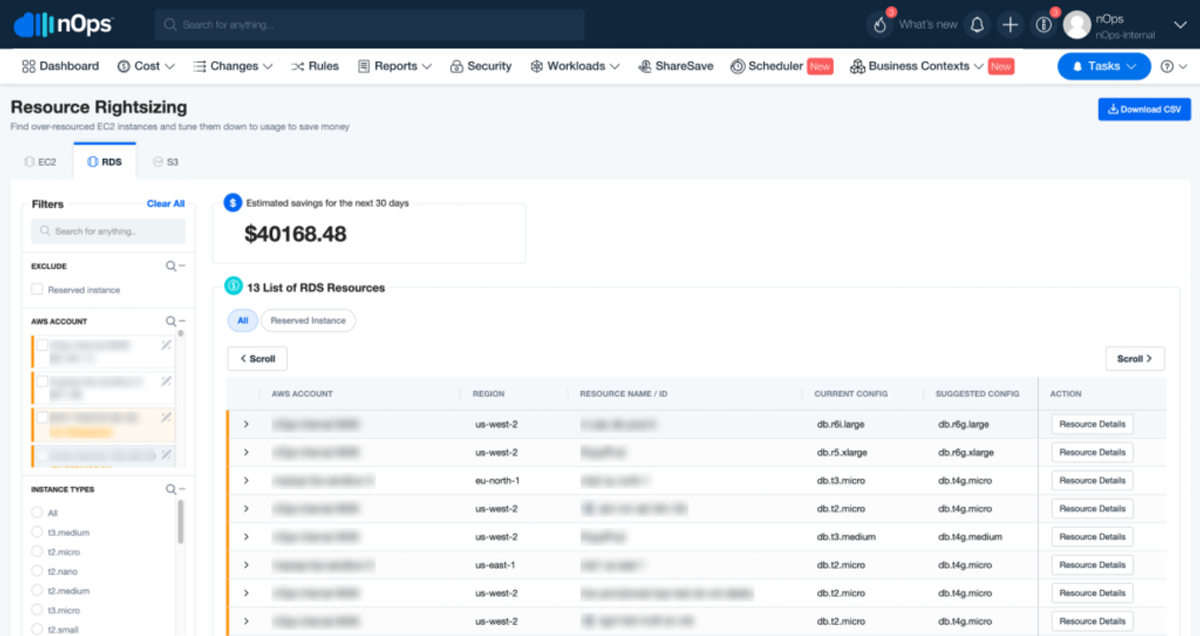
Kubernetes places pods by their requests, so lowering requests to match real usage is what lets nodes consolidate and node counts fall. Everything downstream, from Spot capacity to commitment levels, is sized against that baseline.
Setting accurate requests and limits
Base requests on measured usage over a window long enough to include your peaks, a full business cycle at minimum, and set them near a high percentile of observed use rather than the average. Treat memory more carefully than CPU. A container that exceeds its memory limit is OOM-killed, while one that exceeds its CPU limit is throttled, so memory requests should sit close to peak and, for many workloads, equal the memory limit. For latency-sensitive services, some teams drop CPU limits entirely and rely on requests for fair scheduling. Whatever you set, change it in stages and watch restarts and latency after each step.
Vertical Pod Autoscaler (VPA)
VPA watches usage and adjusts requests. Its update modes are Off, which only produces recommendations; Initial, which applies them at pod creation; Recreate, which evicts pods to apply them; and InPlaceOrRecreate, which resizes without a restart when the cluster supports it and falls back to eviction otherwise. In-place pod resize reached GA in Kubernetes 1.35, which removes the main objection to running VPA on restart-sensitive workloads. Start in Off mode and use the recommendations as input to a review, and don't pair VPA with an HPA that scales on the same CPU or memory metric, since the two will act on the same signal.
Identifying overprovisioned workloads
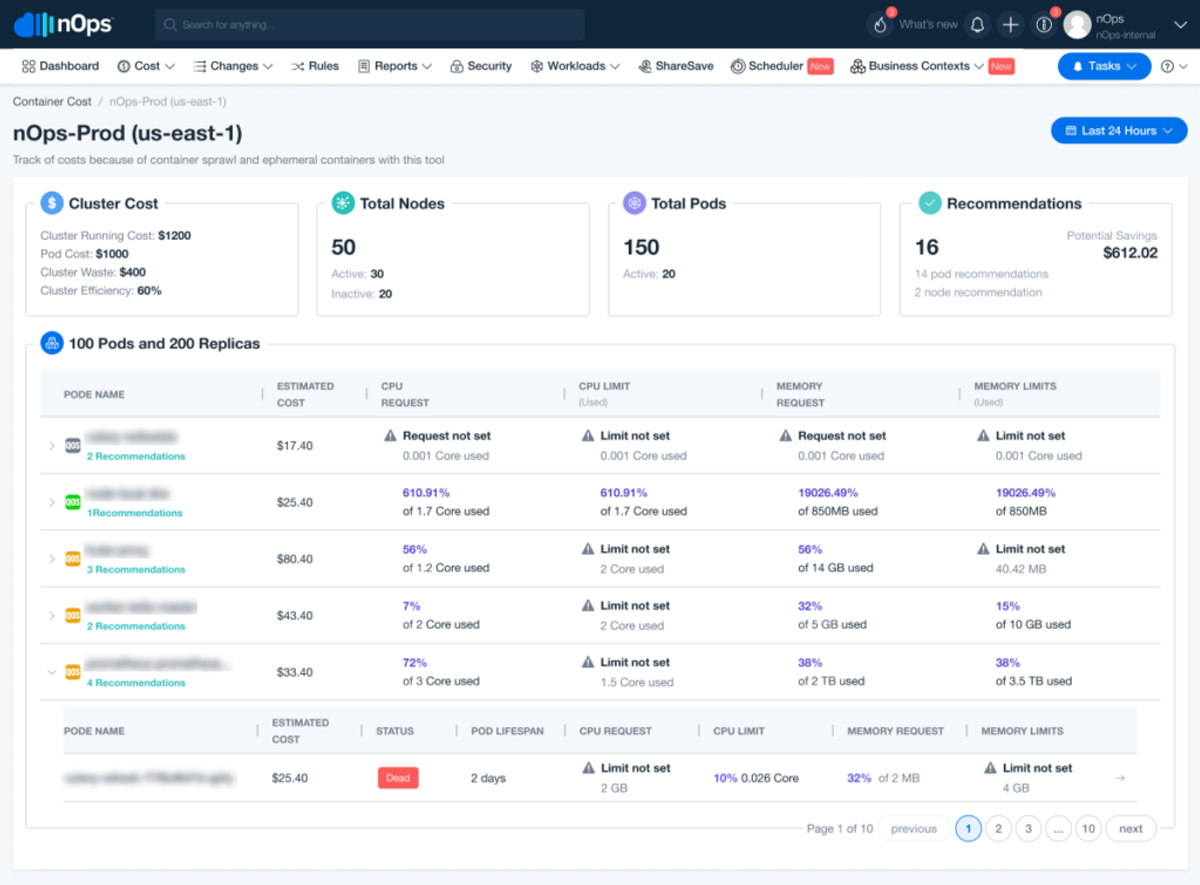
Rank workloads by the dollar value of the gap between requested and used capacity, not by percentage: a 20-replica service requesting 2 vCPU per pod and using 0.4 holds 32 idle vCPUs, which at the $0.029 per vCPU-hour rate in AWS's own split cost allocation example for an m7g.2xlarge is about $677 a month from one deployment, while a small cron job at 5% utilization costs almost nothing. Pull requested and used CPU and memory per workload over 30 days from Prometheus or Container Insights, price the difference at your node cost per vCPU-hour and GB-hour, and work down the list from the top.
Right-sizing node instance types
Node shape matters as much as pod size. Pods that need a high memory-to-CPU ratio on an instance family built for the opposite ratio strand one resource: CPU sits idle or you buy larger nodes than the pods need. Compare each node group's allocatable CPU and memory against the sum of pod requests, and the resource with the larger unused share is the one the shape is wrong for. Fewer, larger nodes also spread the fixed overhead of system pods, since DaemonSets run one pod on every node, and allowing a wide range of instance types lets the scaler pick the cheapest fit (see Karpenter below).
Autoscaling Strategies
Autoscaling cuts cost by matching capacity to demand at two levels: pods, through HPA and KEDA, and nodes, through Cluster Autoscaler or Karpenter. Pod scaling decides how much capacity is requested, and node scaling decides how efficiently that capacity is packed onto machines you pay for.
Horizontal Pod Autoscaler (HPA)
HPA adds or removes replicas based on observed metrics, CPU and memory by default and custom metrics through adapters. For cost, its job is removing off-peak replicas, which saves money only if the nodes beneath them scale down too. Set minReplicas to what the service needs at its overnight trough rather than at peak, and set a CPU target high enough that replicas run busy instead of lightly loaded. Scale-down is deliberately slow, with a default stabilization window of five minutes, so expect capacity to linger briefly after traffic drops.
Cluster Autoscaler vs Karpenter
Cluster Autoscaler scales existing node groups: it adds a node of a group's fixed instance type when pods are pending and removes underused ones, so your node group design determines your cost. Karpenter provisions nodes directly from the requirements of pending pods, choosing from a range of instance types, sizes, and capacity types, and replaces or removes nodes when consolidation saves money. The cost difference is that Karpenter picks the cheapest instance that fits what is pending, including Spot and Graviton where you allow them, instead of scaling a predetermined shape. Switching has real costs: NodePool design, disruption settings, and workloads that tolerate node churn. EKS Auto Mode runs Karpenter-based provisioning for you (see the compute section below), and nOps publishes an ultimate guide to Karpenter for teams running it themselves.
Karpenter consolidation and bin-packing
Consolidation is where Karpenter's savings come from. With consolidationPolicy set to WhenEmptyOrUnderutilized, Karpenter removes empty nodes and replaces or deletes underutilized ones when their pods fit elsewhere or on a cheaper node; WhenEmpty removes only nodes with no workload pods. Disruption budgets cap how many nodes can be disrupted at once and can block consolidation during business hours on a schedule. For Spot nodes, deletion consolidation is on by default, while replacing one Spot node with a cheaper one requires enabling the SpotToSpotConsolidation feature and enough instance-type flexibility in the launch request. Pair consolidation with PodDisruptionBudgets and topology spread constraints, because disruption budgets alone won't stop replicas from landing on the same node and leaving together.
KEDA and event-driven scaling
KEDA is a CNCF graduated project that extends HPA with more than 70 built-in scalers for sources such as queues, streams, and Prometheus queries, and, unlike HPA, it can scale a workload to zero. Scale-to-zero is the cost feature: queue consumers, batch processors, and scheduled jobs pay nothing while idle. The trade-off is cold start, up to one polling interval, 30 seconds by default, after the first event arrives, so reserve it for workloads that tolerate the delay.
Scheduled scaling for non-production environments
Dev, test, and staging environments rarely need to run overnight or on weekends. Running one 12 hours a day on weekdays covers 60 of the week's 168 hours, a 64% cut in compute hours. KEDA's cron scaler can scale deployments to zero on a schedule, and once pods are gone, Karpenter's consolidation removes the empty nodes. A cluster scaled to zero still pays its $73 control plane fee, so for environments used a few hours a week, deleting and recreating them from code, or moving them into namespaces on a shared cluster, saves more than scheduling does.
Choosing the Right Compute Model and Purchasing Options
These choices set the price of every node-hour once the workload is sized correctly. Their discounts stack: Graviton lowers the base price, Spot or Savings Plans discount that price, and Auto Mode or Fargate change who manages the nodes.
Spot Instances for EKS
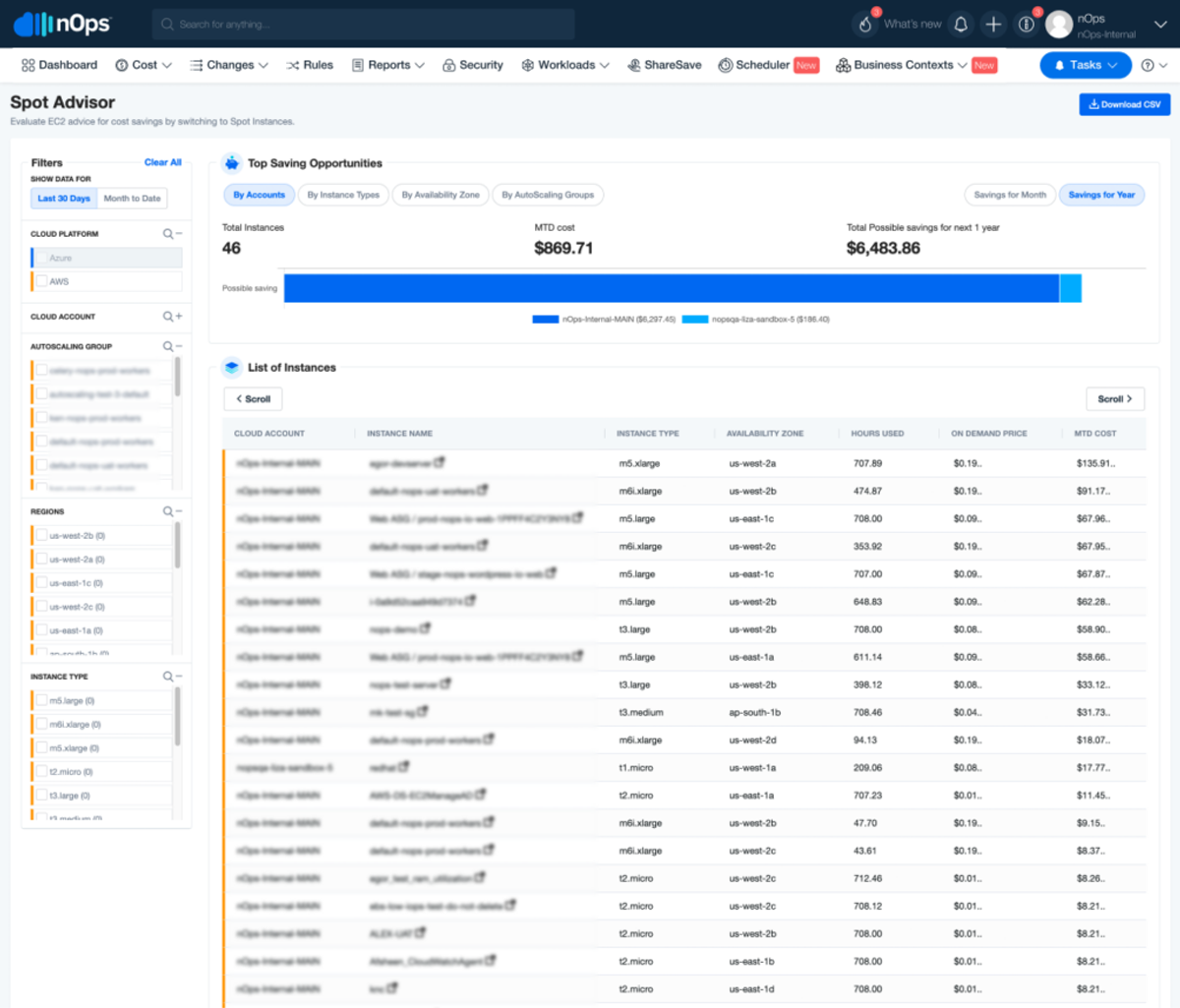
Spot offers discounts of up to 90% against On-Demand, in exchange for AWS reclaiming the instance with a two-minute notice. On EKS that fits stateless services with several replicas, batch jobs, CI runners, and anything that tolerates a restart. It doesn't fit single-replica services or stateful workloads without replication, and AWS advises against Spot for workloads that cannot handle individual instance interruption. AWS's guidance is to diversify across instance sizes, generations, types, and Availability Zones and to use the price-capacity-optimized allocation strategy. In Karpenter, a NodePool that allows both capacity types prefers Spot first. Run at least two replicas spread across zones, handle interruption notices so nodes drain gracefully, and keep a base of On-Demand or committed capacity for what can't be interrupted.
Savings Plans vs Reserved Instances
Compute Savings Plans cut EC2 prices by up to 66% regardless of instance family, size, Region, or OS, and also cover Fargate and Lambda. EC2 Instance Savings Plans reach up to 72% but bind you to one instance family in one Region. Both apply to the EC2 nodes in EKS clusters, though not to the EKS cluster fee itself, and neither applies to Spot usage or usage already covered by Reserved Instances. Commitments can't be canceled during the term, which makes instance family the main risk: an EC2 Instance plan on m5 stops covering nodes the day Karpenter starts choosing Graviton, while a Compute plan keeps covering them. For EKS clusters whose node mix changes, Compute Savings Plans are the safer default, and Reserved Instances add the same rigidity at the instance-type level. nOps compares the options in its Savings Plans vs Reserved Instances guide.
Graviton (ARM) instances
AWS says EKS workloads on Graviton-based instances deliver up to 40% better performance and up to 20% lower cost than comparable x86 instances. The migration cost is in the images: every container has to be built for arm64, usually as multi-arch images so one tag runs on either architecture, and DaemonSets, sidecars, and third-party agents need arm64 builds too. Roll out by adding a Graviton NodePool or node group beside x86, pinning a few low-risk workloads to it with a kubernetes.io/arch node selector, and widening from there. Adoption is still early, with ARM nodes at about 9% of the CPU fleet in Cast AI's data, so most clusters have not yet captured this saving.
EKS Auto Mode
Auto Mode is a cluster mode, generally available since December 1, 2024, in which AWS runs Karpenter-based node provisioning, scaling, patching, and upgrades for you. It adds a per-instance management fee on top of EC2, roughly 10 to 12% of the On-Demand price on common instance types; for an m5.large that is about $0.0115 an hour on top of $0.096. AWS states that the fee is independent of the EC2 purchase option, so Savings Plans and Spot discount the instance but not the management fee. (In July 2026 AWS cut Auto Mode fees on GPU instances by 35% for G-series and 60% for P-series and Trainium.) Auto Mode doesn't lower your EC2 bill; it removes node-management work and, through Karpenter-style consolidation, node waste. It fits teams without the capacity to run Karpenter themselves, while teams that already run it well would be paying the fee for work they've already done.
Fargate vs managed node groups vs self-managed nodes
Managed node groups are EC2 Auto Scaling groups that AWS provisions and upgrades for you, self-managed nodes give you full control of the image and lifecycle at the price of operating them, and Fargate removes nodes entirely. Fargate on EKS doesn't support DaemonSets, privileged containers, GPUs, or Fargate Spot, so anything that depends on per-node agents or accelerators stays on EC2. On cost, Fargate charges by pod request, which rewards well-sized pods and suits small, bursty, or isolated workloads where an EC2 node would sit mostly empty. It loses to well-packed EC2 nodes on steady load, where its list price runs about 21% above On-Demand EC2 in the earlier example, and its Compute Savings Plans discount tops out at up to 50% against up to 66% on EC2. Most teams start with managed node groups and move to self-managed only for requirements managed groups can't meet. nOps covers the container-service side in its Fargate cost optimization guide.
Reducing Storage and Networking Costs
Storage and networking charges follow data volumes, traffic between zones, and the number of load balancers and gateways, none of which node-level optimization reduces. Most of the fixes are configuration changes made once.
EBS optimization (gp3 migration, snapshot cleanup)
gp3 volumes cost $0.08 per GiB-month, 20% less than gp2, include a baseline of 3,000 IOPS and 125 MiB/s at any size, and can be converted from gp2 in place with a modify-volume call without detaching or restarting. Set the default StorageClass to gp3 so new persistent volume claims don't start on gp2, then migrate existing volumes. Check throughput needs before converting large gp2 volumes, since gp2 performance scales with size. For cleanup, list volumes in the "available" state, which are attached to nothing but still billing, and put old snapshots under a lifecycle policy such as Amazon Data Lifecycle Manager or AWS Backup retention rules.
Choosing between EBS, EFS, and FSx
EBS is block storage that attaches to one node in one Availability Zone, and at gp3 rates it is the cheapest per GB. EFS is a shared file system that many pods across zones can mount, priced at $0.30 per GB-month for Standard storage in us-east-1, almost four times the gp3 rate, with lower-cost infrequent access tiers for cold data. Use EFS when pods genuinely need shared read-write access and EBS when they don't; EFS used as a default for convenience is a common source of storage overspend. FSx file systems are priced by type, capacity, and throughput, and are justified by performance or protocol requirements, such as Lustre for high-throughput training and batch workloads, rather than by price per GB.
Cutting cross-AZ data transfer
At $0.01 per GB in each direction, a service pair exchanging 1 TB a day across zones costs roughly $600 a month (about $0.02 per GB counting both sides). Kubernetes can keep traffic local: the trafficDistribution field with PreferClose is GA since Kubernetes 1.33, and the value is now also called PreferSameZone. It routes to same-zone endpoints first and falls back to other zones when none are healthy. It can overload endpoints in a busy zone, so pair it with topology spread constraints and enough replicas in every zone. Also place each NAT gateway in the AZ that uses it, as AWS advises, so NAT traffic doesn't pay a cross-zone charge on top of processing fees.
NAT gateway alternatives and VPC endpoints
Traffic from private subnets to AWS services goes through the NAT gateway by default and pays $0.045 per GB. Gateway endpoints for S3 and DynamoDB are free and remove that traffic from NAT entirely. Interface endpoints for other services, such as ECR and CloudWatch, cost $0.01 per hour per AZ plus $0.01 per GB, so each saves $0.035 per GB and pays back its roughly $7.30 monthly per-AZ base charge at around 210 GB of traffic a month (arithmetic from the published rates, consistent with this analysis). For the internet egress that remains, options include a NAT instance in non-production, a single NAT gateway for dev, and IPv6 egress-only gateways where destinations support them.
Load balancer consolidation
Each ALB carries about $16 a month in fixed charges before traffic, so 20 team-owned ALBs cost roughly $329 a month at idle against about $33 for two. The AWS Load Balancer Controller can share one ALB across multiple Ingress resources through an Ingress group, and it creates a separate Network Load Balancer for every Service of type LoadBalancer, which is how many clusters accumulate dozens of them. Route HTTP services through a shared ingress layer, and keep dedicated NLBs for the TCP workloads that need them.
Governance and Guardrails
A one-time cleanup decays: new workloads arrive with template requests, test clusters get created and forgotten, and Kubernetes versions age past support. Guardrails enforce the rules at admission and on a schedule instead of relying on review.
Resource quotas and limit ranges
A ResourceQuota caps the total requests, limits, and object counts a namespace can consume, and a LimitRange sets default and maximum requests per container so workloads that omit them get sensible values instead of unlimited ones. Set namespace quotas from each team's budgeted share so overspending shows up as a failed deploy rather than a line on next month's bill, and review them when budgets change.
Shutting down idle dev and test clusters
Give every non-production cluster and environment an owner and an expiry tag at creation, and run a scheduled job that flags or deletes anything past its date or showing near-zero CPU and no deployments for a set number of days. Build preview environments from code and tear them down when the pull request closes. Each idle cluster costs its $73 control plane fee plus nodes, NAT gateways, and load balancers, so the cleanup is worth automating.
Upgrading Kubernetes versions to avoid extended support fees
Track each version's end-of-standard-support date on the EKS version calendar and schedule upgrades a few months ahead, in the order control plane, add-ons, then nodes, after checking for deprecated API usage. At the fleet level, AWS lets you set a cluster's upgrade policy to STANDARD, which disables extended support and upgrades the cluster automatically at the end of standard support. That avoids the $0.60 fee but hands AWS the timing of the upgrade, so use it where you've tested upgrades and keep the default only for clusters that need the extra time.
Policy as code for cost controls
Admission policies, written for OPA Gatekeeper or Kyverno, turn the earlier conventions into enforced rules: reject pods without resource requests, cap the maximum request per container, require team and environment labels, restrict Service type LoadBalancer outside approved namespaces, and require the gp3 StorageClass. The same idea applies before deploy: policy checks in the infrastructure-as-code pipeline can block gp2 volumes, extra NAT gateways in dev VPCs, or clusters without an expiry tag. Start in audit mode to see what would fail, then switch to enforcement namespace by namespace.
Which Approach Should You Use?
The levers have a natural order because each one changes the baseline the next is sized against. Right-size and schedule first, add node-level efficiency and Spot next, commit to what remains, and recognize the point where doing all of this by hand stops being practical.
Start with right-sizing and scheduling when...
Requested CPU far exceeds used CPU, non-production environments run around the clock, or you can't yet say which team owns which namespace's spend. These changes need no new infrastructure, carry little risk when staged, and lower the baseline every later decision depends on. Turn on pod-level allocation at the same time, so you can see each change land in dollars.
Add Karpenter and Spot when...
Requests are within reason and the waste that remains is at the node level: fragmented nodes, fixed node groups with the wrong instance shape, or scale-ups that strand capacity. Add Spot when some workloads are stateless, run multiple replicas across zones, and shut down inside two minutes. CI, batch, and stateless web tiers are the usual first candidates, with an On-Demand or committed base kept for everything else.
Layer in Savings Plans when...
The first two steps have settled. Commitments are sized to the steady baseline and can't be canceled, so buying before right-sizing locks in the overprovisioned baseline. Commit to the hourly floor you reliably use, which is the minimum rather than the average, choose Compute Savings Plans if instance families will keep changing, and plan to adjust as Spot share, Graviton migration, and consolidation reshape usage.
When manual optimization stops scaling
Manual optimization works for a few clusters in one account. It stops scaling when several teams deploy to shared clusters, when spend spans multiple accounts and clouds, when commitment coverage drifts every time the instance mix changes, and when engineers spend more time maintaining the cost pipeline than reducing cost. What remains at that point is continuous work: allocation that stays accurate as workloads change, commitments rebalanced as usage shifts, and anomalies caught while they are small. That is the work tooling should take over.
The Limits of Native and Open-Source EKS Cost Tooling
AWS and the open-source ecosystem cover parts of this problem well. Each stops somewhere, and the gaps are where teams end up building custom pipelines.
Cost Explorer and CUR report, but neither optimizes
Cost Explorer reports spend by service, account, and tag, and the CUR adds line-item detail, including the split cost allocation fields. Cost Explorer also produces Savings Plans recommendations and reporting, but a person still has to evaluate, buy, and rebalance them, and recommendations reflect historical usage rather than the changes you are about to make. Neither tool resizes a pod, tunes a scaler, or adjusts commitments as your cluster changes. They tell you what happened; acting on it is a manual process.
Kubecost and OpenCost allocate and resize, but don't touch pricing
OpenCost is a CNCF open-source project for allocation and reporting, with data retention set by your Prometheus configuration. Kubecost, now owned by IBM, builds on it; its free tier covers unlimited clusters up to 250 cores with 15-day retention, and multi-cluster aggregation and longer retention require paid tiers. Kubecost does go beyond reporting: with its Cluster Controller installed, Actions can apply container request right-sizing on a schedule and turn down clusters and namespaces, and Apptio documents these as available in the self-hosted product. Several of the sizing features are labeled experimental or beta in the docs. Neither tool acts on the pricing layer: they allocate what you spent and resize what is requested, but they don't buy, layer, or rebalance Savings Plans, which is where the largest discounts sit. nOps compares itself directly in Kubecost vs nOps.
Multi-cluster and multi-account blind spots
In-cluster tools see only the clusters where you install them, and they have to be deployed, upgraded, and kept supplied with metric storage on every one; Kubecost's free tier also caps total cores and retention. AWS's split cost allocation data is configured at the payer account and scans EKS clusters across the consolidated billing family, which covers multiple AWS accounts, but it stops at AWS. Clusters on AKS or GKE, and the SaaS and AI spend that increasingly sits beside Kubernetes bills, fall outside it, so organizations running more than one cloud end up reconciling several reports by hand.
The engineering cost of maintaining a DIY cost stack
A do-it-yourself stack has several moving parts: CUR or Data Exports, Athena or QuickSight, a Prometheus workspace for usage-based allocation, policy enforcement for labels, shared-cost rules, and reconciliation of credits and discounts. Each has a run cost and an owner. AWS recommends an hourly CUR with resource IDs for the most granular data, and that choice grows the tables: AWS's own formula adds 48,000 new CUR records a day for 1,000 hourly pods on ten instances. Add the engineering time to keep queries current as schemas and clusters change, and the stack becomes a standing project with a headcount cost that the savings have to cover.
Automating EKS Cost Optimization with nOps
nOps ties pod-level allocation to commitment management and reporting in one platform, so the data that explains where EKS spend goes also drives the savings that reduce it.
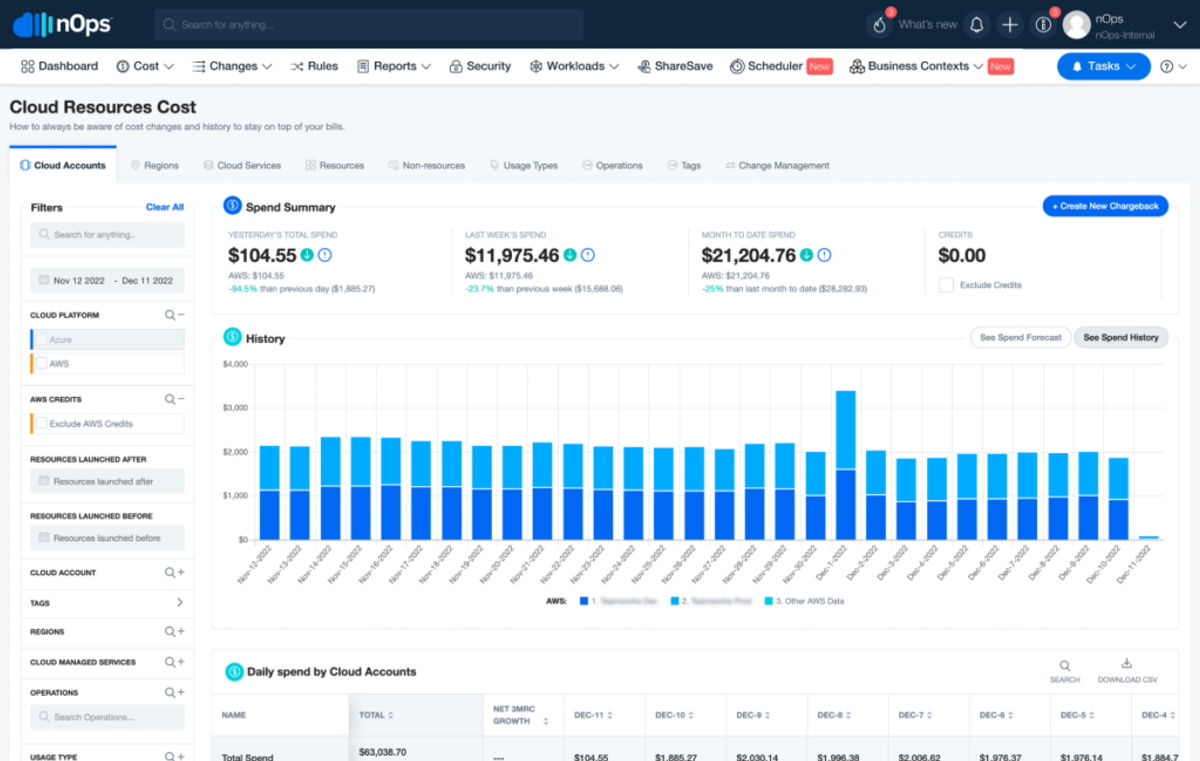
- Container and pod-level cost allocation without a custom pipeline. nOps combines CUR data, in-cluster usage, and workload metadata to allocate 100% of your AWS bill down to the container level, with automated tagging, showbacks, and chargebacks, and it handles Reserved Instance amortization, credits, and shared costs. There is no Athena pipeline or Prometheus workspace to build or maintain.
- Commitment management on top of the same data. Commitments are layered continuously in small hourly increments, so coverage follows the cluster as Karpenter consolidation, Graviton migration, and Spot usage change the baseline, instead of drifting until the next manual review. It works alongside whatever Kubernetes-native tooling you already run for node scaling and pod sizing, including Karpenter and Cast AI. See nOps Commitment Management.
- Anomaly detection and alerting for cluster-level spend spikes. Dashboards, budgets, forecasting, and anomaly detection cover Kubernetes spend alongside everything else, so a runaway deployment, a misconfigured autoscaler, or a NAT traffic spike surfaces as an alert rather than as a surprise on the invoice.
- Reporting that pairs visibility with automated optimization. The same reports span Kubernetes, multicloud (AWS, Azure, and GCP), SaaS, and AI spend, so platform, finance, and engineering work from one set of numbers, and the commitment automation acts on the figures those reports show.
Optimize EKS automatically with nOps
nOps makes it easy to understand and optimize all of your cloud costs.
Maximize savings. nOps continuously layers commitments in small hourly increments to capture 55%+ savings while minimizing overcommitment risk — even for dynamic workloads
Results-based pricing model: Customers typically save ~20% more by switching to nOps — and you pay only when you get better results.
Free Savings Analysis: Quantify exactly how much more you can save for no work on your part. We optimize, and you get the credit.
You can book a free savings analysis to find out how nOps can help you start saving today!
nOps processes over $5 billion in cloud spend and was recently named #1 in G2's cloud cost management category.
Frequently Asked Questions
Short answers to the questions teams ask most often about EKS cost.
How much does an EKS cluster cost per month?
The control plane costs $0.10 per hour, about $73 a month per cluster, or $0.60 per hour, about $438 a month, once the Kubernetes version is in extended support. Nodes, storage, networking, and load balancers are billed on top. For example, three On-Demand m5.large nodes cost about $210 a month (3 × $0.096 × 730 hours), so a small cluster lands near $283 a month before storage, networking, and load balancers.
Is Fargate cheaper than EC2 for EKS?
Usually not at list price. A 2 vCPU, 8 GB pod costs about 21% more on Fargate than the equivalent On-Demand m5.large, and Compute Savings Plans discount Fargate by up to 50% versus up to 66% on EC2. EKS also doesn't support Fargate Spot. Fargate comes out ahead when EC2 nodes would sit mostly empty, as with small, bursty, or isolated workloads, or when removing node management is worth the premium.
Is Karpenter better than Cluster Autoscaler for cost savings?
For clusters with varied workloads, usually yes. Karpenter chooses an instance type for each batch of pending pods and consolidates underutilized nodes, while Cluster Autoscaler scales node groups of fixed instance types. The gain depends on how fragmented your nodes are today, and a cluster already well packed into one or two uniform node groups will see a smaller difference. Switching requires NodePool design and disruption controls.
Is it safe to run production workloads on Spot Instances?
Yes, for workloads that tolerate interruption: stateless services with multiple replicas spread across zones, graceful shutdown inside AWS's two-minute notice, and diversified instance types. It isn't safe for single-replica or stateful workloads without replication. Keep an On-Demand or committed base for capacity that can't be interrupted, and let AWS best practices guide instance diversification.
How do I see cost per pod or namespace in EKS?
Enable split cost allocation data for EKS, which is free, and query pod-level costs in the CUR with Athena or the QuickSight Containers Cost Allocation dashboard, grouping by the aws:eks:namespace tag. That covers EC2 compute only, so control plane, EBS, load balancer, and network costs need separate allocation rules. A platform such as nOps allocates all of those at the container level without a custom pipeline.
Demo
AI-Powered Cost Management Platform
Discover how much you can save in just 10 minutes!
Book a Demo
6 Steps to Optimize Your AWS EKS Costs