

ECS Cost Optimization: How to Reduce Your AWS Bill
With cloud spending forecasted to hit $1 trillion by 2027, EC2 is often the most expensive item on your AWS bill. ECS is the most widely-used EC2 container orchestration service, but it presents some unique challenges for cost-optimization — particularly if you’re using advanced strategies like running on Spot.
This practical guide will focus on the key ECS cost optimization strategies, actionable tips, how-to guides, screenshots, and other critical info you need to start saving on your ECS costs.
Monitoring
The first step in controlling costs is understanding your cloud environment. Let’s discuss the essential tools and strategies for monitoring ECS environments and best practices for managing them efficiently.
The most common ECS monitoring tools include:
- AWS CloudWatch: CloudWatch Provides monitoring and management for AWS cloud resources and the applications running on AWS. Includes logs, metrics, alarms, and events. Direct integration with ECS for monitoring CPU and memory utilization, network, and disk metrics.
- AWS CloudTrail: AWS CloudTrail records AWS API calls for your account. Provides a history of AWS API calls for your account, including calls which are useful for auditing changes in ECS services and tasks.
- Third-Party Monitoring Tools: Tools like Datadog, New Relic, and Prometheus can integrate with ECS through APIs for additional monitoring capabilities.
Aspect | Best Practice | Tools/Strategies Used |
Logging and Analysis | Aggregate and analyze container logs | CloudWatch Logs, ELK stack |
Alarms and Notifications | Set up alerts for critical metrics to monitor and control AWS costs; receive alerts when spending exceeds predefined thresholds. | CloudWatch Alarms, SNS |
Cluster Health | Monitor cluster resources and task health | CloudWatch Metrics |
Service and Task Management | Optimize service definitions and tasks, implement version control and change management processes | ECS Console, AWS CLI |
Security Management | Regularly audit and enforce AWS IAM policies and compliance | IAM, AWS Config |
Resource Optimization | Rightsize resources based on performance data, use cost-saving strategies such as leveraging Spot instances | CloudWatch, ECS Capacity Providers |
It’s worth noting that proper tagging of your EC2 resources is a prerequisite for proper monitoring. The benefits of a robust tagging strategy are to:
- Improve visibility into your workloads
- Attribute shared costs to individual teams, projects, departments, environments, and business units
- Programmatically manage infrastructure
- Identify underutilized resources
- Investigate spikes in usage and trace them back to specific causes
Tip: Use Container-Level Metrics for ECS cost optimization. Implement detailed container-level monitoring to gain insights into specific containers or services driving costs. Third-party tools can help you filter spending by resource type, compute type, tags, and other dimensions to investigate spikes and the biggest drivers of your cloud costs. For more information on allocating your AWS costs, you can download the complete guide.
Right-Sizing ECS Resources
By analyzing historical usage and performance, you can identify and rightsize instances that are not consuming all the resources currently available to them. Keep in mind:
Rightsize regularly. As your dynamic usage changes, regularly assess and adjust the ECS task definitions to ensure that the allocated CPU and memory are in line with the actual usage. Over-provisioning leads to unnecessary costs, whereas under-provisioning can affect performance. Learn how right-sizing affects AWS ECS cost structures and billing rates.
Utilization Metrics: The key to safe rightsizing is data. Use AWS CloudWatch, Datadog, another third-party tool or a custom engineering solution to monitor resource utilization and identify optimization opportunities. AWS’s general rule for EC2 instances is that if your maximum CPU and memory usage is less than 40% over a four-week period, you can safely reduce capacity.
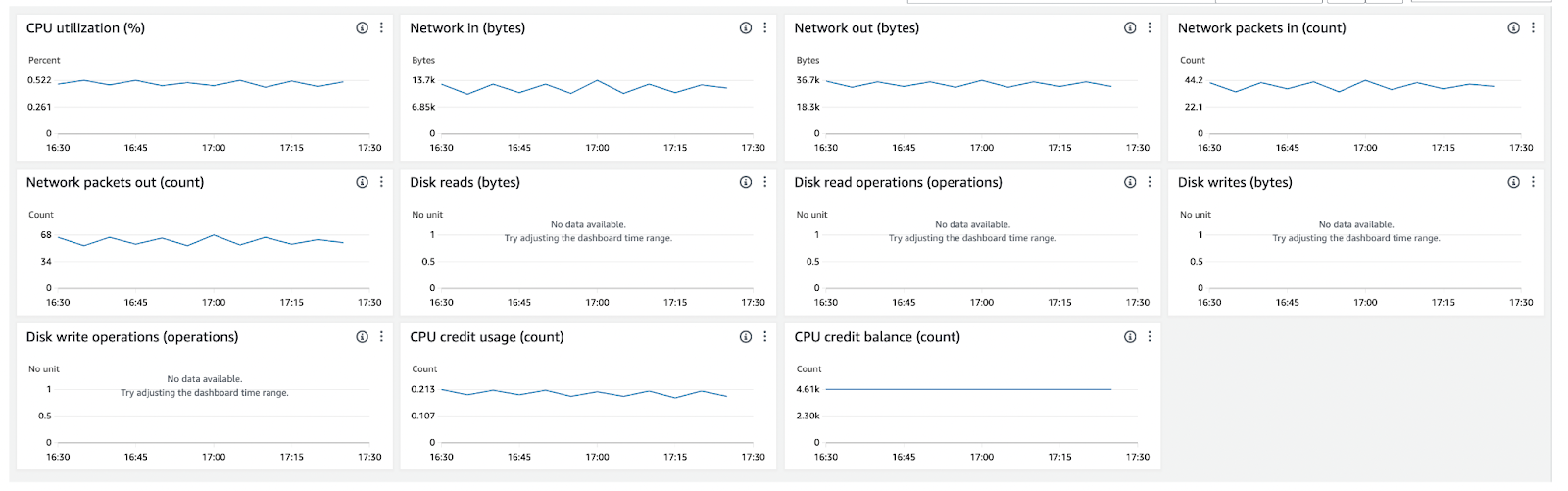
For extensive and specific information and best practices on how to rightsize with CloudWatch, Datadog or other metrics, check out this free ebook.
Right-Sizing ECS Resources
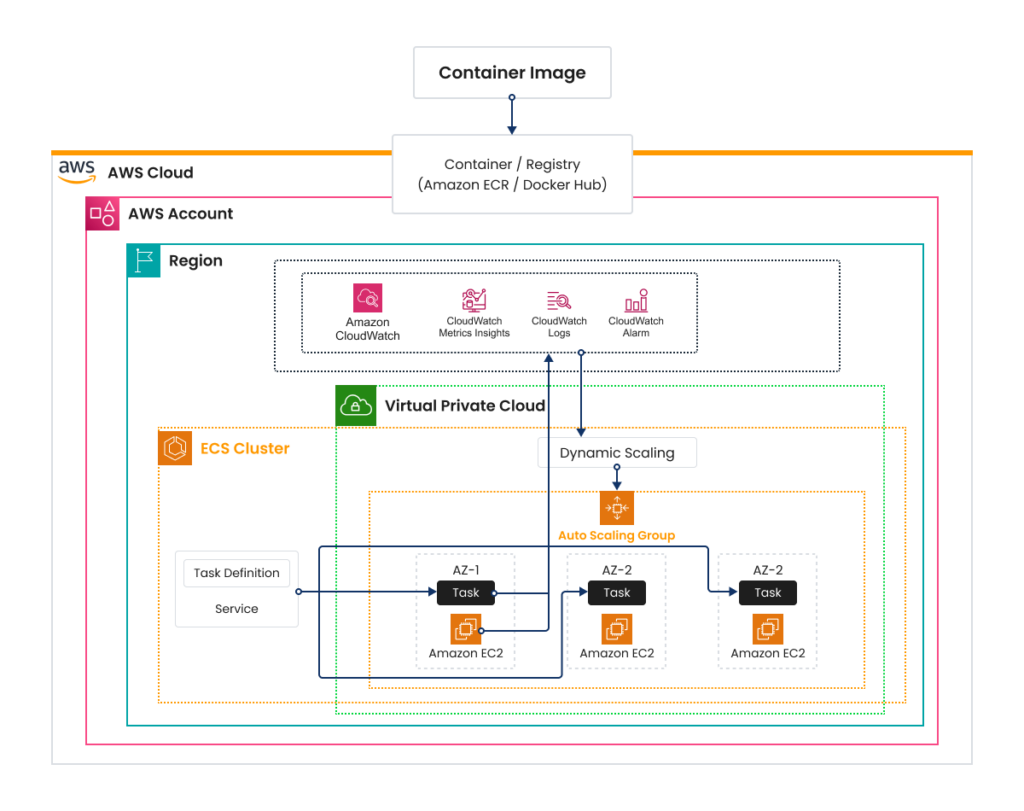
ECS auto scaling involves automatically adjusting the number of running ECS tasks in response to configured CloudWatch alarms. You can also scale the underlying EC2 instances based on demand, ensuring that there are always enough resources to run tasks without over-provisioning.
AWS ECS supports various scaling strategies to ensure that applications can handle varying loads efficiently: Horizontal, Vertical, Scheduled, Dynamic, and Predictive Scaling. Let’s talk about the differences and how to use them.
General Autoscaling Strategies:
Type | Definition | Best suited for | Best practices |
Horizontal Scaling | Increasing or decreasing the number of container instances or tasks to handle the load. | Applications with variable workloads, where the load can increase or decrease unpredictably | Auto-scaling policies based on metrics |
Vertical Scaling | Changing the compute (CPU, memory) capacity of existing instances. | Applications with predictable, stable workloads that occasionally require more resources | Resize instances based on steady trends |
Scheduled Scaling | Scaling actions are automatically triggered based on a specified schedule. | Workloads that have predictable load changes, like batch processing jobs that run at specific times | Predefine scaling actions for known load patterns |
Now let’s talk about some of the best practices for scaling effectively.
Implement ECS Service Auto Scaling
Use ECS service auto-scaling to adjust the number of tasks automatically based on demand. Leverage EC2 to manage the scaling of the underlying instances. Ensure instances have the necessary resources to support the maximum number of tasks you expect to run. Define scaling policies based on CloudWatch metrics such as CPU and memory utilization.
Related Content
ECS Cost Optimization: The Complete Guide
Actionable tips, how-to steps, screenshots, and more for optimizing ECS costs
Download Now
Dynamic Scaling
Dynamic Scaling adjusts the number of active tasks in an ECS service automatically in response to real-time changes in demand.
Here are the basic steps:
Identify the metrics most critical for your application’s performance and stability. Common metrics include CPU utilization, network throughput, memory usage or custom application-specific metrics.
Establish appropriate minimum, maximum, and desired capacity settings for your ASGs. These should align with your anticipated workload demands, ensuring that the ASG can scale efficiently without over-provisioning.
For example, scale out (add instances) when CPU utilization exceeds a certain threshold, and scale in (remove instances) when the utilization decreases.
One strategy to consider is adjusting settings proactively in advance of predicted changes in demand, optimizing resource utilization and cost. We can also schedule the scaling based on the monitoring metrics where we can observe spikes and create the ASG to scale out during certain events or times of the week.
Cost-optimize this workload by scaling in during off-usage. On the other hand, if your application has sporadic or unpredictable loads, consider using a mix of instances, possibly including burstable types (e.g. AWS T-series) that offer baseline performance with the ability to burst.
Create Dynamic Scaling Policies to properly utilize your resources and maintain cost-effective performance as your usage changes. In the AWS Management Console, go to the Auto Scaling service.Define policies for scaling out and scaling in based on the CloudWatch alarms. Configure your ASG to actively adjust its capacity in anticipation of idle or loading windows, i.e. periods of low and high demand. You’ll need to regularly review historical data in CloudWatch to fine-tune your scaling policies continually.
Configure Scaling Actions: This may include adjusting the desired capacity, minimum and maximum instance counts, and cooldown periods that prevent rapid scaling events in response to fluctuations, ensuring stability.
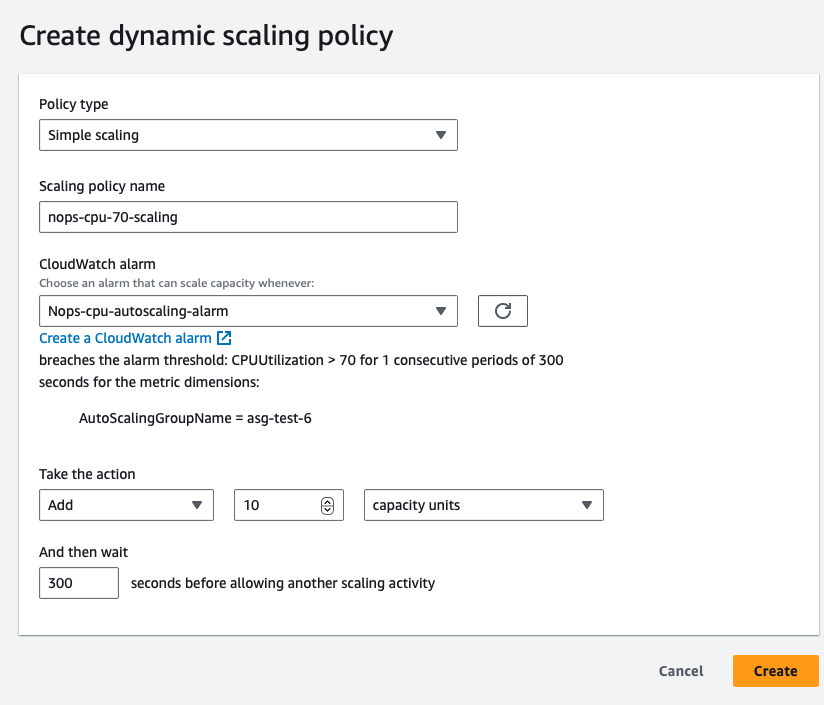
Steps 3 & 4: Create dynamic scaling policies and configure scaling actions based on CloudWatch metrics
Predictive Scaling
Predictive scaling works by analyzing historical load data (e.g. via Amazon CloudWatch Integration) to detect daily or weekly patterns in traffic flows.
It uses this information to forecast future capacity needs, automatically scheduling scaling actions to proactively increase the capacity of your Auto Scaling group to match the anticipated load ahead of expected demand spikes.
Some best practices include:
- Ensure sufficient historical data (typically at least 30 days) is available for accurate predictions.
- Combine predictive scaling with dynamic scaling to handle unexpected surges in demand
- Regularly review predictive scaling decisions and adjust as necessary based on actual demand patterns
Let’s summarize the differences between the above strategies:
Scaling Type | Trigger | Best For | Considerations |
Dynamic | Real-time metrics (e.g., CPU load) | Unpredictable workloads | Requires fine-tuning of metrics and thresholds |
Predictive | Historical data analysis | Predictable, significant fluctuations in load | Depends on quality and quantity of historical data |
Scheduled | Predefined times | Known events or maintenance windows | Must be manually set and adjusted as patterns change |
Additional quick tips for effective scaling
Container packing: Implement task placement strategies that optimize the packing of containers in each EC2 instance to maximize resource utilization. Strategies like ‘binpack’ and ‘spread’ can optimize resource utilization and availability. You can increase container density on each instance as long as it doesn’t compromise performance.
- Binpack: Tasks are placed on container instances to leave the least amount of unused CPU or memory. When this strategy is used and a scale-in action is taken, Amazon ECS terminates tasks. It does this based on the amount of resources that are left on the container instance after the task is terminated. The container instance that has the most available resources left after task termination has that task terminated.
- Spread: Tasks are placed evenly based on the specified value. Accepted values are instanceId (or host, which has the same effect), or any platform or custom attribute that’s applied to a container instance, such as attribute:ecs.availability-zone. Service tasks are spread based on the tasks from that service.
Spot Instances and Fargate Spot
If you’re looking to save on ECS, Spot is key to reducing cost. Spot Instances allow users to take advantage of unused EC2 capacity at a fraction of the standard On-Demand price.
Instance Type | Spot vs. On-Demand Savings | Expected Savings |
General Purpose | Up to 90% cheaper than On-Demand | Very High |
Compute Optimized | Up to 80% cheaper than On-Demand | High |
Memory Optimized | Up to 75% cheaper than On-Demand | Moderate to High |
However, they can be reclaimed by AWS with just a 2-minute warning if there’s higher demand for the capacity. This characteristic introduces a few risks and considerations that need to be managed carefully:
- Service Interruption: The most direct risk is the potential for service interruption. If AWS reclaims Spot Instances, any containers running on those instances will be stopped, which disrupts running services or batch jobs if not properly managed.
- Task Interruptions and Failures: For ECS tasks that are stateful or require longer processing times, interruptions can lead to incomplete transactions or data corruption if not properly handled.
- Increased Management Overhead: To effectively use Spot Instances, you need to implement more sophisticated management strategies such as including handling instance interruptions, increasing the complexity of your infrastructure.
- Variable Costs: While Spot Instances can offer significant cost savings, market prices continually fluctuate based on demand. If not monitored and controlled, costs can potentially spike.
- Capacity Availability: Spot Instance market availability varies and might not always be able to match the scale or specific instance types/sizes your applications require, leading to potential scaling limitations.
However, with the right techniques, you can successfully utilize AWS Spot Instances in conjunction with ECS to significantly reduce costs while maintaining performance and reliability.
Optimize EKS with nOps
nOps makes it easy to understand your cloud costs and save automatically.
Maximize savings. nOps continuously layers commitments in small hourly increments to capture 55%+ savings while minimizing overcommitment risk — even for dynamic workloads
Results-based pricing model: Customers typically save ~20% more by switching to nOps — and you pay only when you get better results.
Free Savings Analysis: Quantify exactly how much more you can save for no work on your part. We optimize, and you get the credit.
You can book a free savings analysis to find out how nOps can help you start saving today!
nOps processes over $4 billion in cloud spend and was recently named #1 in G2's cloud cost management category.