

The Ultimate Guide to Amazon EC2 Pricing in 2026
Before cloud computing, expanding infrastructure meant purchasing physical servers, finding space for them, installing and maintaining the hardware, and forecasting capacity well in advance. Organizations had to balance upfront equipment costs against uncertain future demand.
AWS changed that model by allowing businesses to provision computing resources on demand. With Amazon Elastic Compute Cloud (EC2), users can launch virtual servers in minutes, scale capacity as requirements change, and stop instances when they are no longer needed.
EC2 stands out as the primary cost driver of total AWS spend, and it underpins many of AWS’ most popular services, such as EKS, ECS, Fargate, Auto Scaling Groups, and more.
Let’s walk through EC2 instance types, pricing scenarios, and how to optimize your EC2 spend.
Understanding Amazon EC2 Instances
EC2 was released as an official product in Oct 2008. EC2 provides resizable virtual computing capacity that can be combined with services such as EC2 Auto Scaling to respond to changing demand.
With AWS EC2 specifically, users can choose from various combinations of instance types (such as i3.2xlarge), availability zones or regions (e.g. US East Ohio), and payment methods (On-Demand, Reserved, Spot) to meet their requirements.
As of today, there are five major families of EC2 instance types offered: general purpose, compute-optimized, memory-optimized, accelerated computing, and storage optimized. Additionally, users can further customize their instances by selecting operating systems (typically Windows or Linux) and opting for pre-installed enterprise software like SQL Server or SAP.
This pay-as-you-go model ensures that users only pay for the resources they consume, making it cost-effective for various use cases. The challenge is that workload requirements are rarely known in advance. Accurately forecasting EC2 costs therefore requires teams to understand both their technical needs and how usage may change over time.
How Amazon EC2 Pricing Works
Amazon EC2 pricing is made up of several core components:
Instance Usage
You’re billed for the compute capacity of the instance type you run. This includes the number of vCPUs, amount of memory, and whether the instance is optimized for specific workloads (e.g., compute-optimized, memory-optimized, or GPU-based). More powerful instances cost more per hour, but may complete tasks faster—potentially saving money if workloads are optimized.
Usage Duration and Pricing Models
EC2 supports multiple pricing models:
- On-Demand: Pay per second or hour with no upfront commitment. Best for short-term or unpredictable workloads.
- Reserved Instances (RIs): Commit to 1- or 3-year terms for significant discounts—ideal for steady-state usage.
- Savings Plans: Similar to RIs, but more flexible across instance families and regions.
- Spot Instances: Use spare capacity for up to 90% off—but with the risk of interruptions. Best for fault-tolerant, stateless, or batch workloads.
Storage Costs (EBS Volumes and Instance Store)
Most EC2 instances use Amazon EBS for persistent storage. EBS charges are separate from instance costs and based on:
- Volume type (e.g., gp3, io2)
- Provisioned storage (GB/month)
- IOPS and throughput (for certain volume types)
- Snapshots stored in S3
Instance store (ephemeral storage physically attached to the host) doesn’t incur extra cost, but it’s temporary and can’t be detached or backed up easily—use it only when data persistence isn’t required.
Data Transfer Costs
Data transfer charges are often overlooked but can significantly impact your bill:
- Inbound traffic is generally free.
- Outbound traffic to the internet or across regions is charged per GB.
- Within the same Availability Zone, data transfer between EC2 instances is free when using private IPs.
- Between AZs or VPCs, even in the same region, charges apply and can add up at scale.
Amazon EC2 Pricing Models Explained
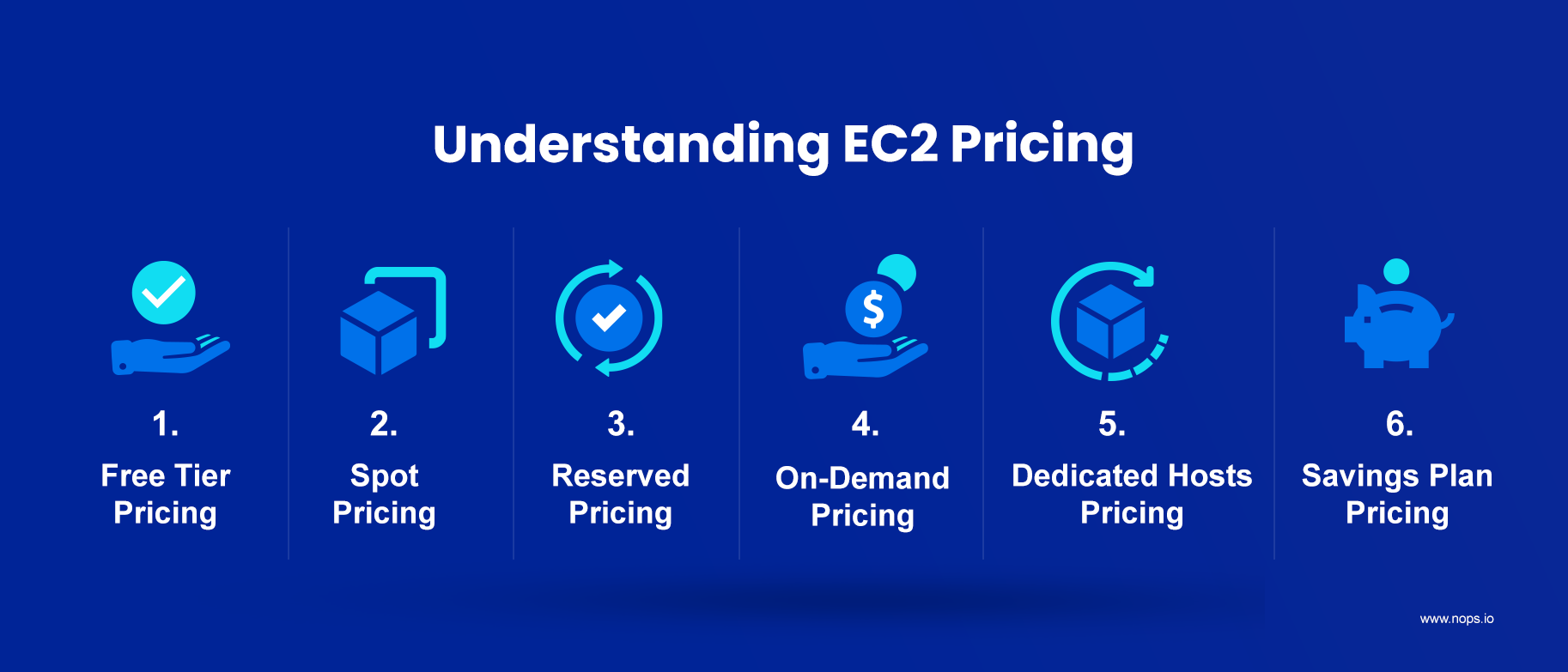
Calculating exact prices for AWS EC2 is not easy. There are several factors that determine the price: instance type, Availability Zone (e.g., Singapore vs Ohio), licensing (e.g. Windows license), and AWS pricing models (below) are all variables to consider.
There are six main models for AWS pricing:
- Free Tier Pricing
- Spot Pricing
- Reserved Pricing
- On-Demand Pricing
- Dedicated Hosts Pricing
- Savings Plan Pricing
Let’s discuss each pricing model in detail.
Free Tier
The Amazon Free Tier serves as a way to get started with AWS and learn about its offerings before committing to paid usage. Cloud users can access AWS Free Tier and test the features before making a long-term commitment. The Free Tier typically includes a limited usage level for select services, such as Amazon EC2, Amazon S3, and Amazon RDS.
When to use Free Tier
- You’re new to AWS and want to try out EC2 at no cost
- You’re testing small-scale apps or dev environments
- You want to validate service behavior before scaling
Spot Pricing
Spot Pricing is the next cheapest option. Spot Instances are spare computing resources available on the AWS cloud. With Spot Pricing, users access spare EC2 capacity at prices set by AWS based on long-term supply and demand trends. Spot Instances are ideal for applications that have flexible start and end times or that can handle interruptions. They allow users to take advantage of cost savings, sometimes up to 90% off the On-Demand price.
Spot Instances are also subject to interruptions when Amazon EC2 needs the capacity back, meaning that applications designed to use Spot should be fault-tolerant. The user will receive a two-minute notification before termination.
When to use Spot Pricing
- You’re running stateless, fault-tolerant workloads like CI/CD, batch jobs, or big data processing
- You want to reduce compute costs for dev/test environments
- You can architect around interruptions and maintain SLAs
Reserved Instances
Reserved Instances provide discounted pricing for matching EC2 usage. Zonal RIs also reserve capacity in a specific Availability Zone. Reserved Instances provide discounted rates in exchange for a one- or three-year commitment. Customers can choose All Upfront, Partial Upfront, or No Upfront payment options. RIs generally cost more than Spot Instances but provide predictable discounts without interruption risk. AWS applies discounts of up to 72 percent on this plan.
RIs are well-suited for predictable workloads that require long-term usage, providing cost stability and lower hourly rates compared to On-Demand instances. AWS provides both Standard and Convertible Reserved Instances for EC2. It’s best to purchase Convertible Reserved Instances as they provide more flexibility.
You can explore the AWS pricing table for updated prices.
When to use Reserved Instances
- You have steady-state workloads that run 24/7
- Your usage is predictable and unlikely to change soon
- You’re able to commit to a specific instance family and region
Related Content
The Ultimate Guide to AWS Commitments
Best practices and advanced strategies for maximizing AWS discounts
Download Now
On-Demand Pricing
On-Demand prices let users pay as they go, offering flexibility and no upfront costs. With On-Demand Pricing, users pay for the compute capacity they consume on a per-hour or per-second basis, depending on the instance type. On-Demand prices can be 27 percent to 35 percent higher than Reserved Pricing. This model is best suited for applications with unpredictable workloads, where instances are needed immediately and without long-term commitments.
When to use On-Demand Pricing
- You have unpredictable or bursty workloads that need flexibility
- Operations that cannot tolerate interruptions, such certain migrations
- You want flexibility without upfront commitment
You can use an On-Demand pricing calculator for more details.
Dedicated Hosts
AWS Dedicated Hosts provide a physical server for a specific account, allowing greater control over the underlying hardware and instance placement. Dedicated Hosts Pricing offers a per-hour fee for the host, regardless of the number of instances running on it. Dedicated Hosts are typically used by organizations that have specific compliance, regulatory, or licensing requirements that necessitate dedicated hardware resources.
Users can choose On-Demand or Reserved Pricing for Dedicated Hosts. AWS provides a table explaining the prices of various Dedicated Hosts.
When to use Dedicated Hosts
- You have strict compliance or regulatory requirements
- You need per-socket or per-core software licensing (e.g., Oracle, Windows Server)
- You want physical server isolation from other tenants
Savings Plans
AWS Savings Plans offer a flexible pricing model that allows users to commit to specific usage at discounted prices. With AWS Savings Plans, users pay a fixed hourly rate for a period of either one or three years. There are two types of Savings Plans:
- EC2 Savings Plans apply to instances with a specific region and provide discounts of up to 72 percent. They are ideal for stable workloads that are unlikely to change over time.
- Compute Savings Plans apply a committed hourly spend across eligible EC2, AWS Fargate, and AWS Lambda usage. They offer more flexibility and are ideal for large organizations whose demand for resources keeps changing.
When to use Savings Plans
- You want discount flexibility across instance types, OS, or regions
- Your usage patterns change but overall spend is consistent
- You want simplified commitment management over Reserved Instances
Key Factors to Consider: Amazon EC2 Costs
Several operational and architectural decisions can significantly affect how much you pay for Amazon EC2. Below are the most important factors to consider when estimating or managing your compute spend.
Clock Hours of Server Time
You’re charged for how long your instances are running—regardless of whether they’re actively doing work. If you leave instances running during off-hours or forget to shut them down after testing, you’re still billed. For On-Demand, AWS charges per second (with a minimum of 60 seconds) for Linux instances, and per hour for some Windows instances. Stop or terminate idle instances to avoid wasted spend.
Instance Types
The instance family you choose determines the compute resources—and the price—you’re paying for. Each instance type is optimized for a specific workload (e.g., compute, memory, storage, GPU). Choosing an overpowered or mismatched instance type can result in unnecessary costs. For example, using an r5.4xlarge for a low-memory app means you’re paying for unused memory. Always rightsize based on real usage metrics.
Pricing Models
Your pricing model choice has the biggest impact on EC2 savings potential. AWS offers On-Demand, Reserved Instances, Savings Plans, Spot Instances, and Dedicated Hosts. Spot is cheapest but comes with the risk of interruption. RIs and Savings Plans require long-term commitments but deliver consistent discounts. Choosing the right model depends on workload duration, predictability, and fault tolerance.
Number of Instances and Provisioning Resources
More instances mean higher costs—but so does poor provisioning. Running too many instances or over-allocating CPU and memory wastes budget. Conversely, underprovisioning can lead to performance bottlenecks. Use tools like Compute Optimizer or nOps rightsizing to match instance count and specs to your actual workload needs.
Load Balancing with ELB
Elastic Load Balancing (ELB) improves availability but adds hourly and data processing charges. Each load balancer has a base hourly cost and a per-GB charge for data processed. If your app doesn’t require high availability across zones, or if you’re routing minimal traffic, you might not need ELB—or might be able to consolidate load balancers.
Elastic IP Addresses
AWS charges for all public IPv4 addresses, including Elastic IPs attached to running instances and addresses left idle. Review your environment regularly and release addresses that are no longer needed.
Auto Scaling
Auto Scaling can reduce costs—if it’s configured properly. The goal is to dynamically match instance count to demand. But if your scaling thresholds are too aggressive or cooldown periods too short, you could end up launching too many instances. Regularly review scaling policies and metrics to make sure Auto Scaling works for you, not against your budget.
Additional Costs Affecting Amazon EC2 Costs
Beyond compute and instance usage, there are several supporting services and infrastructure elements that can significantly affect your EC2 bill. These often go unnoticed until they start to add up.
- Data Transfer: Data transfer charges can quickly become a major cost center—especially for high-throughput applications. AWS doesn’t charge for inbound traffic or data transferred between instances in the same Availability Zone using private IPs. But traffic going to the internet, across Availability Zones, or between regions is billed per GB. If you’re running a web app serving global users, or replicating data across regions, these costs can quietly balloon.
- Elastic Load Balancing (ELB): While ELB helps with fault tolerance and scaling, it incurs additional costs beyond your EC2 charges. You’re billed by the hour per load balancer and by the amount of data processed. If you’re running many small applications with their own load balancers, consolidating them could cut costs. Also, poorly tuned health checks or unnecessary cross-zone routing can inflate usage charges.
- EBS Snapshots: Snapshots are stored in Amazon S3 and billed based on the amount of data stored—not the total size of the volume, but the incremental changes. This means frequent snapshots or retaining too many versions can drive up costs. It’s best practice to automate snapshot retention policies and periodically delete old snapshots that are no longer needed.
- NAT Gateway: NAT Gateways allow private instances to access the internet, but they come with hourly rates and per-GB data processing charges. If you’re routing all outbound traffic through a NAT Gateway—especially large volumes—you might face unexpected costs. For high-volume use cases, replacing NAT Gateways with NAT Instances or consolidating traffic flows can result in significant savings.
How EC2 Options Have Expanded Over Time
As of May 2025, AWS offers over 5 million distinct EC2 configurations, a significant increase from 4.45 million in June 2023. This growth is largely attributed to the expansion of AWS Regions and the introduction of new instance types. For instance, the number of AWS Regions has grown to 36, with 114 Availability Zones.
Notable Observations:
- u-6tb1.metal Instance Availability: The u-6tb1.metal instance, designed for SAP OLAP workloads, was previously available in multiple regions, including Asia Pacific. As of May 2025, its availability is limited to select regions, such as Europe (Zurich) .
- Region with Most Offerings: The EU (Ireland) region now hosts the highest number of EC2 offerings, surpassing US East (N. Virginia), which previously held this position.
- AWS GovCloud (US): This region continues to provide specialized services for U.S. government agencies, operated by U.S. citizens on U.S. soil, ensuring compliance with stringent regulatory requirements.
The rapid expansion of EC2 offerings underscores the importance of leveraging tools like nOps to automatically optimize instance types and compute usage on your behalf.
Managing your Amazon EC2 Spend with nOps
nOps helps teams reduce EC2 costs by optimizing instance usage, placing suitable workloads on Spot capacity, and automatically managing Reserved Instances and Savings Plans as usage changes. The benefits include:
- Reduce risk with adaptive layering automation. We implement commitment layering at a granularity no human team can replicate. Dozens of small commitments, each sized to current usage, each expiring on its own schedule. The result? More incremental savings (up to 55%), with far less risk of overcommitment.
- Results-based pricing model: Customers typically save ~20% by switching to nOps — and you pay only when you get better results.
- Free Savings Analysis: Quantify exactly how much more you can save for no work on your part. We optimize, and you get the credit.
We’ve talked to companies that can save millions on their cloud bills by switching to nOps from competitors. Book a free savings analysis to find out if nOps can help you get more value out of your cloud investments.
nOps manages $4B+ in cloud spend and was recently rated #1 in G2’s Cloud Cost Management category.
Demo
AI-Powered Cost Management Platform
Discover how much you can save in just 10 minutes!
Book a Demo
Frequently Asked Questions
What are the 3 main pricing options with EC2?
EC2 offers On-Demand, Reserved Instances, and Spot Instances as its primary pricing models. On-Demand is pay-as-you-go with no long-term commitment, ideal for short-term workloads. Reserved Instances require a 1- or 3-year commitment for significant discounts, best for steady-state usage. Spot Instances offer discounts up to 90% off but can be interrupted. Choosing the right option depends on workload predictability, tolerance for interruptions, and cost optimization goals.
How to calculate AWS EC2 cost?
To estimate EC2 costs, consider instance type, pricing model, region, storage, and data transfer. Use the AWS Pricing Calculator to input specific configurations and get a cost estimate. On-Demand pricing is based on per-second billing, while Reserved Instances and Savings Plans offer discounts for long-term usage. Don’t forget to factor in attached EBS volumes, bandwidth, and licensing if applicable.
Is AWS EC2 free to use?
AWS offers limited free EC2 usage through the AWS Free Tier. For accounts created on or after July 15, 2025, eligible new customers receive credits that can be applied to EC2 and other AWS services. Older accounts may qualify for the previous 750-hours-per-month offer during their first 12 months. Beyond the applicable limits, standard EC2 charges apply.
Is EC2 cheaper than VPS?
EC2 can be cheaper than traditional VPS hosting when you optimize with Spot Instances, Reserved Instances, or automation tools. However, VPS providers often offer flat-rate pricing that may seem simpler and cheaper for small workloads. EC2’s flexibility and scalability are advantages, but managing it requires more expertise. For startups or small apps, VPS may be more affordable. For scalable, production-grade infrastructure, EC2 typically delivers better long-term value.
The Ultimate Guide to Amazon EC2 Pricing in 2026